HandBrake For Mac

Convert videos to MP4 and MKV on Mac.
Free
Version 1.11.2
HandBrake for Mac Overview
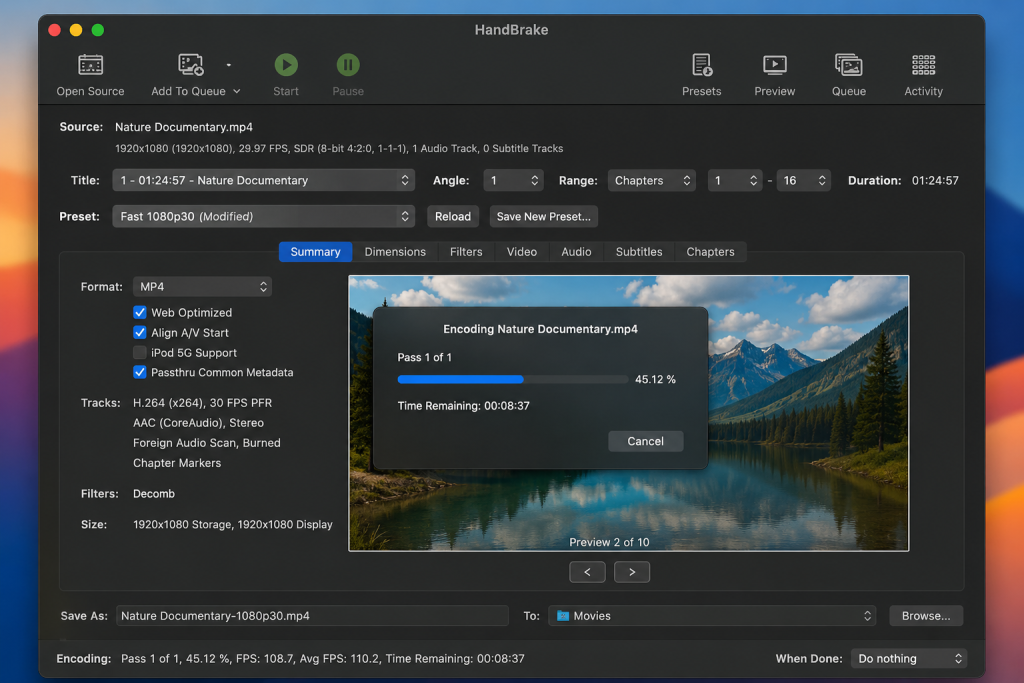
HandBrake for Mac is a free, open-source video converter that lets you convert, compress, and optimize videos with ease. Whether you’re reducing file sizes, converting videos to MP4 or MKV, or preparing media for playback on different devices, HandBrake delivers fast, high-quality results without compromising video quality.
Designed for both beginners and advanced users, HandBrake supports a wide range of input formats and offers customizable presets for Apple devices, Android, web streaming, and more. Its intuitive interface makes video conversion simple, while advanced options such as codec selection, subtitles, chapter markers, and batch encoding provide greater control over every conversion.
HandBrake also supports modern video codecs, including H.264, H.265 (HEVC), AV1, VP9, MPEG-4, and more, making it an excellent choice for compressing large videos while maintaining impressive quality. Whether you’re converting home videos, DVDs (that you own and are legally permitted to convert), or media files, HandBrake is one of the best free video converters available for macOS.
If you’re looking for a reliable, lightweight, and feature-rich video transcoder, HandBrake for Mac is an excellent solution for fast, secure, and efficient video conversion.
Key Features
- Free and Open Source – Enjoy powerful video conversion with no cost or hidden fees.
- Convert to MP4 and MKV – Save videos in the most widely supported output formats.
- Wide Format Support – Import videos from most common file formats.
- High-Quality Video Compression – Reduce file sizes while preserving excellent video quality.
- Modern Video Codecs – Supports H.264, H.265 (HEVC), AV1, VP9, MPEG-4, and more.
- Built-in Device Presets – Optimize videos for Mac, iPhone, iPad, Android, Apple TV, and other devices.
- Batch Encoding – Convert multiple videos at once to save time.
- Subtitle and Audio Support – Add, remove, or preserve subtitles and multiple audio tracks.
- Chapter Marker Support – Keep or create chapter markers for supported videos.
- Advanced Video Controls – Adjust bitrate, resolution, frame rate, filters, cropping, and encoding settings.
- Fast Performance – Optimized for efficient video processing on modern Macs.
- Regular Updates – Frequent improvements, bug fixes, and support for the latest macOS versions.
- This content is written to be human-readable while naturally including important SEO keywords such as HandBrake for Mac, free video converter, video compressor, macOS, MP4, MKV, and video transcoder.